



Your Stripe checkout, on your own store
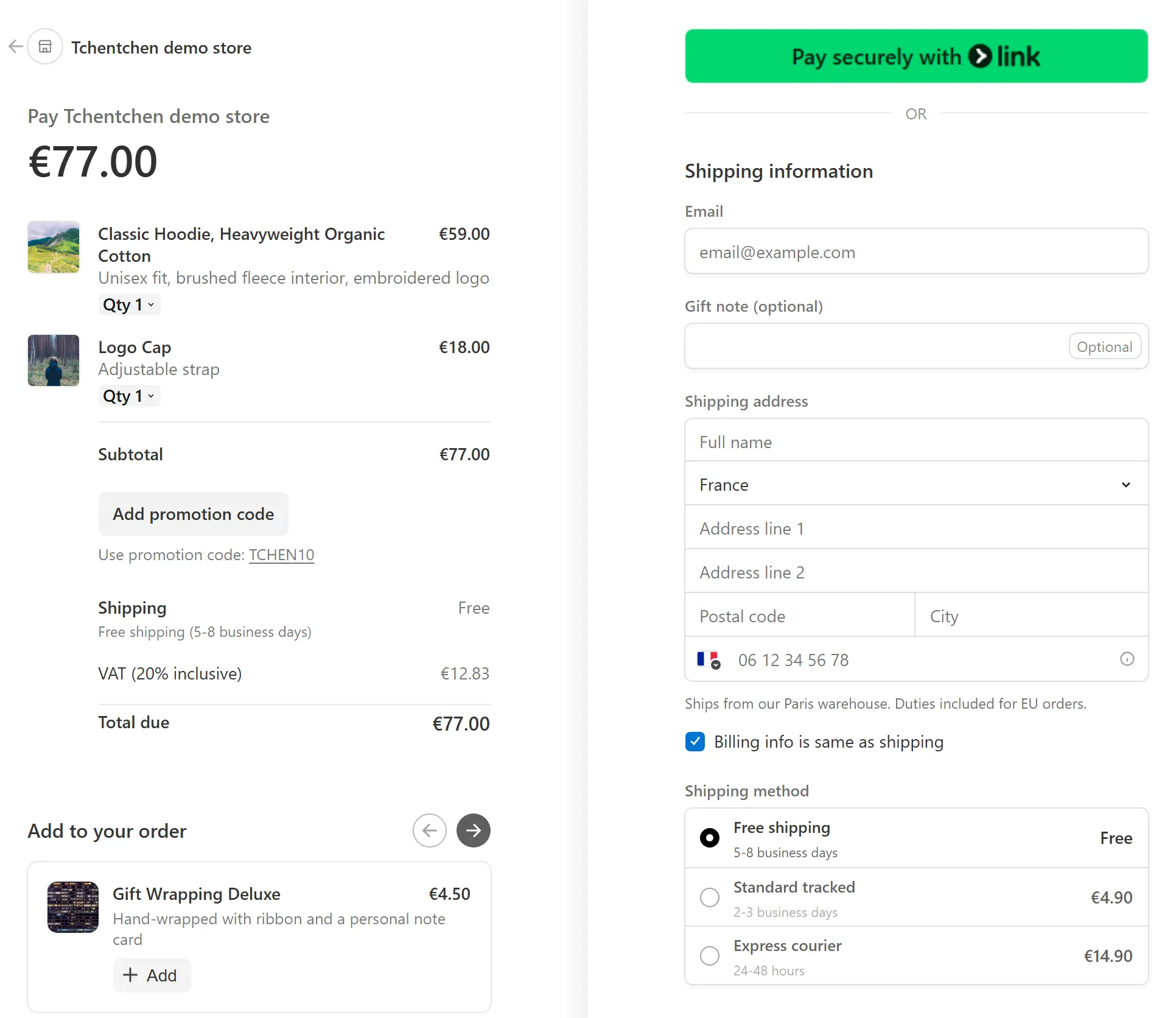
Tchentchen puts Stripe's payment form on a page of your own store. Your shipping and tax rules apply, upsells sit next to the order summary, one more offer follows the payment, and everything lands in one order.
- Stays on your domain
- Stripe pays you directly
- Free, no limits
Product
Everything between the cart and the thank you page
Checkout on your store
Stripe's payment form opens on a page of your store, with your carriers, delivery prices and tax rules.
See the checkoutUpsells and after-sell
Offers from your catalog before payment, and one more offer after it, added in one click.
See the offersOne order in your back office
Every product and every Stripe payment lands in the order your store creates.
See the order
Every sale has a sound.
Run your cursor across the string, or tap it.
How it works
Live in three steps
Install the plugin
Create your free account and download the plugin from your dashboard. Install it in your store's back office, then click Connect to Tchentchen.
Connect Stripe
Approve Tchentchen from your Stripe account in one click. No keys to copy or paste.
Start selling
Your cart opens the new checkout. Try it in test mode, then switch to live.
Compare
Hosted Stripe Checkout vs Tchentchen
Both use Stripe's payment form. The difference is where your buyer pays, and how much of your store comes along.
| Feature | Hosted Stripe Checkout | Tchentchen |
|---|---|---|
| Payment form built and tested by Stripe | Yes | Yes |
| The buyer pays on a page of your store | No | Yes |
| Carriers and delivery prices asked from your store when the address changes | No | Yes |
| Your store's tax rules applied as the address changes | No | Yes |
| One-click offer after payment | No | Yes |
| After-sell added to the same order in your store | No | Yes |
| Apple Pay, Google Pay and Link on cart and product pages | No | Yes |
Platforms
One checkout for every open store
Available today for PrestaShop 1.7.8, 8 and 9. WooCommerce, Magento, OpenCart, Shopware and Sylius are on our roadmap, with the same checkout and the same after-sell.
See all platforms- PrestaShop1.7.8, 8 and 9Available
- WooCommerceWordPressRoadmap
- MagentoRoadmap
- OpenCartRoadmap
- ShopwareRoadmap
- SyliusRoadmap
Your money
Stripe pays you directly
Every payment is made on your own Stripe account. Tchentchen is the checkout, not a payment provider.
The buyer
Pays on a page of your store, in Stripe's own payment form.
Stripe
Takes the payment and runs its fraud and bank checks.
Your Stripe account
Holds the payment in your name, like any other Stripe payment.
Your bank
Receives the payout on your usual Stripe schedule.
Tchentchen builds the checkout page and creates the order in your store. It never holds your money and never sees card numbers.
When Stripe changes
More than a checkout: a team that keeps it working
On March 25, 2026, a new version of Stripe's API renamed the setting that tells Checkout how to show its payment page: hosted became hosted_page. Stores that call Stripe with their own code kept working until their Stripe library was updated. From that day, every checkout failed with an error, and sales were lost until someone noticed.
With Tchentchen, watching for that is our job, not yours.
One Stripe version, tested
Your checkout runs on a Stripe version we have tested. Every update is tested on PrestaShop 1.7.8, 8 and 9 before it reaches your store.
Your shopper can still pay
If Stripe ever refuses to open a checkout, your shopper goes to your store's own checkout instead of an error page.
We watch every store
Your store checks its own setup before your first sale and reports to our team. A fix reaches every store through automatic updates.
You do not just get a checkout. You get the best checkout in the world, and a team that keeps it working on your store.
Pricing
Free, no limits
Every feature, for every store and every order. All you need is a Stripe account.
Everything included
Checkout, upsells, after-sell and express buttons.
Unlimited stores
Connect every store you run.
Your Stripe account
Payments and payouts stay with Stripe, in your name.
FAQ
Questions, answered
A free plugin that puts Stripe's checkout on a page of your own store. It adds your shipping and tax rules, upsells and a one-click offer after payment, and creates one order in your back office.
Yes. Payments are made on your own Stripe account and payouts follow your usual Stripe schedule. You connect Stripe by approving Tchentchen once, and you can disconnect it at any time.
No. Stripe takes every payment on your Stripe account and pays you out directly. Tchentchen never holds funds and never sees card numbers.
PrestaShop 1.7.8, 8 and 9 today. WooCommerce, Magento, OpenCart, Shopware and Sylius are on our roadmap.
From your Tchentchen dashboard. Create your free account, download the plugin, then install it in your store's back office.
No. The checkout opens on a page of your store. Methods that need an approval, such as a bank redirect, open that step and bring the buyer straight back.
Yes. Connect Stripe in test mode, place test orders on your store with Stripe's test cards, then connect live mode when you are ready.
Yes. Every feature is free, with no limit on stores or orders.
Ready to hear tchen tchen?
Create your free account, connect Stripe in test mode and try the checkout on your own store.